
Screenshots

Introduction
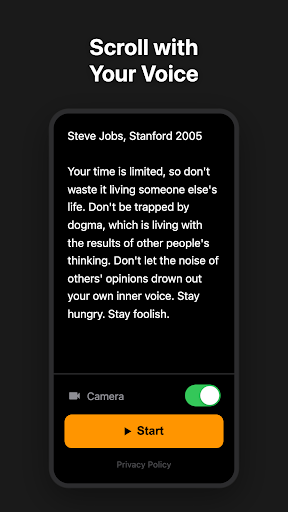
VoiceScroll is a unique voice-powered teleprompter application developed by darak, enabling users to effortlessly scroll through their scripts as they speak. Gone are the days of cumbersome remote controls, foot pedals, or manual scrolling. With VoiceScroll, all you need to do is paste your script, hit start, and communicate naturally. The app utilizes real-time speech recognition technology to automatically advance your text, allowing for a seamless speaking experience. Whether you're a public speaker, content creator, or someone looking to practice their presentation skills, VoiceScroll is designed to enhance your performance with its innovative features.
Graphics & Gameplay
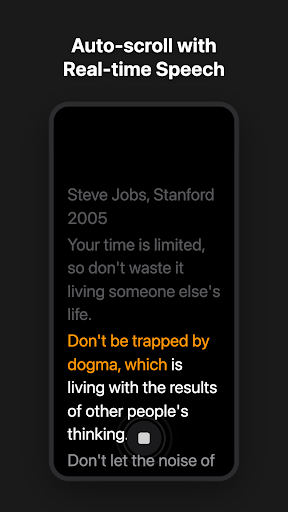
The visual design of VoiceScroll is clean, intuitive, and user-friendly. The screenshots showcase a modern interface that prioritizes readability and functionality. Users can see the current word highlighted in orange, while spoken words fade to gray, ensuring you always know your position in the script. The upcoming text remains bright white, making it easy to anticipate what comes next.
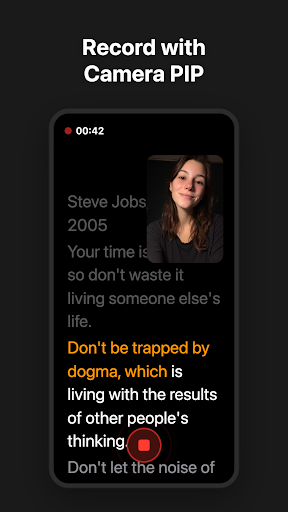
One of the standout features is the Picture-in-Picture (PIP) mode, where you can record yourself while reading. This feature allows for a draggable camera feed overlay, giving you the flexibility to switch between the front and back cameras seamlessly. The interface supports both portrait and landscape orientations, adapting to your preferred reading style. The pinch-to-zoom functionality enhances accessibility, allowing users to adjust the text size between 20sp and 80sp instantly, ensuring optimal comfort while reading.
Key Features
- Voice-Activated Auto Scroll: The app listens to your voice in real-time, advancing your script to match your speaking pace. This hybrid voice tracking maintains smooth scrolling even during pauses.
- Real-Time Word Highlighting: Stay on track with the current word glowing orange, spoken words fading to gray, and upcoming text highlighted in bright white.
- Camera Recording with PIP: Record your sessions while reading, with a draggable camera feed overlay. Save your videos with subtitle overlays and export time-synced .srt subtitle files.
- Offline Functionality: VoiceScroll uses on-device speech recognition, ensuring your voice and scripts remain private. There’s no need for cloud processing or an internet connection.
- Multi-Language Support: The app supports 22 different languages, automatically detecting the language of your script, including English, Spanish, Chinese, and more.
- Customizable Display: Users can easily zoom in and out on the text to fit their preferences, enhancing readability.
- Built-in Sample Scripts: New users can kick-start their experience with included famous speeches for practice and testing.
- Simple Pricing: The app allows a free trial for scripts up to 300 characters, with a one-time purchase option for full features, eliminating the need for subscriptions.
Mod Features
For users interested in enhanced functionality, several mod features could enhance the VoiceScroll experience:
- Premium Unlocked: Access to all premium features without any restrictions, including unlimited script lengths and advanced customization options.
- No Ads: An ad-free experience allows for uninterrupted use of the app, making it perfect for serious presentations and recordings.
- Unlimited Money: A fictional feature that would provide users with credits to unlock additional scripts, templates, or premium features effortlessly.
- Advanced Voice Recognition: Enhanced speech recognition capabilities to recognize different accents and dialects for even smoother scrolling.
- Additional Language Packs: Access to a wider range of languages and dialects, allowing for greater versatility in script presentations.
How to Install APK on Android
Installing the VoiceScroll APK on your Android device is a straightforward process. Follow these steps to get started:
- Enable Unknown Sources: Go to your device's Settings, then tap on Security. Enable "Install unknown apps" to allow installation from sources other than the Play Store.
- Download the APK: Click on the download link provided below to get the VoiceScroll APK file.
- Locate the File: Open your file manager app and navigate to the folder where the APK file was downloaded.
- Install the App: Tap on the APK file and follow the on-screen instructions to complete the installation.
- Open VoiceScroll: Once the installation is complete, find the app icon on your home screen or app drawer and tap to launch it.
Conclusion
VoiceScroll — Teleprompter is an innovative and powerful tool for anyone looking to elevate their public speaking, video creation, or rehearsal sessions. With its unique voice-activated scrolling, customizable features, and privacy-focused design, it is an excellent choice for both beginners and professionals. Don't miss out on this fantastic app that simplifies the art of delivering polished presentations.
Ready to enhance your speaking experience? Download VoiceScroll now from the link below!